Pages

Saturday, August 29, 2026

The REAL Best Time to Visit Disney World & Universal Orlando Crowds, weather, and prices — decoded 🔎

​If there's one question I get more than any other, it's this: "Ann, when should we go?" I love that question, because the real answer isn't one date on a calendar — it's three questions rolled into one: how crowded will it be, how comfortable will the weather be, and how much is this going to cost you. Let's walk through all three, so you can pick dates that actually fit your family instead of guessing.

🎢 First, Let's Talk Crowds

Both Disney World and Universal Orlando follow a pretty predictable rhythm tied to school schedules and holidays. Here's the pattern I watch for my own clients:

Quieter windows worth circling:

  • Mid-January through early February (right after the New Year's rush)
  • September, especially the weeks right after Labor Day
  • Early November, before Thanksgiving travel picks up
  • The first two weeks of December, before the 24th

Dates to plan around, not for:

  • Christmas week through New Year's Day (the busiest stretch of the year, hands down)
  • Spring Break (mid-March through mid-April, varies by school district)
  • The week surrounding July 4th
  • Thanksgiving week and Presidents' Day weekend

One insider tip that holds true almost every week of the year: Tuesday through Thursday are consistently quieter than weekends at both destinations. If your schedule is flexible, shifting your park days mid-week can make a bigger difference than shifting your whole trip by a month.

☀️ Now, the Weather

Orlando doesn't have four dramatic seasons, but it definitely has moods:

  • Winter (Dec–Feb): Peak comfort season — mild days, cool evenings, and the lowest odds of a surprise downpour. Pack a light layer for mornings.
  • Spring (Mar–May): Warm and pleasant early on, with humidity creeping up by May. This overlaps with Spring Break, so nice weather often means bigger crowds too.
  • Summer (Jun–Aug): Hot, humid, and prone to daily afternoon thunderstorms. This is also the start of hurricane season, worth watching if you're traveling June through November.
  • Fall (Sep–Nov): Still warm in September, with hurricane season at its peak, but it cools off nicely by November. Late September through early November is a bit of a hidden gem — lower crowds and easing heat.

💰 What About Prices?

Here's where it gets a little more nuanced. Both Disney and Universal now use date-based ticket pricing, so a single day of park admission can cost more on a busy day and less on a quiet one. Resort and room discounts also come out in seasonal waves, often released several months ahead of the travel dates they cover, with deeper savings for longer stays.

The pattern that tends to hold true: the same off-peak windows that are quieter and more comfortable weather-wise also tend to line up with the better room discounts and lower per-day ticket pricing. It's not a guarantee every single year, but it's strong enough that it's the first thing I check when a client gives me flexible dates.

🌟 My Favorite "Sweet Spot" Windows

If I had to pick the windows that check the most boxes — lower crowds, more comfortable weather, and better odds of a good discount — I'd point you toward mid-January through early February or the first half of December. Early-to-mid September is a close third if you can handle a little extra warmth for a lot fewer lines.

Every family's "best" time is a little different depending on school schedules, budget, and how much heat you can tolerate. That's the fun part of my job — matching real dates to your real life, then keeping an eye out for the discount windows that apply to your trip so you don't have to track all of this yourself.




All the Best,
Ann

Travel Insurance: The One Packing List Item You Can't See (But Really Need)

​A friendly, no-jargon guide to protecting your trip

You've been dreaming about this trip for months. Maybe it's Disney World with the kids, a Universal Orlando adventure, or the cruise you've had pinned to your vision board for years. Right now, you're probably focused on all the fun details — and that's exactly how it should be. But there's one quiet piece worth a moment of your attention too: travel insurance. It isn't the exciting part of planning, but it may be the most important.

So, What Does It Actually Cover? 🛡️

Here's the short version, friend to friend:

  • Trip cancellation & interruption — if life throws you a curveball (illness, family emergency, you name it) and you have to cancel or cut the trip short, you're not left holding the bill.
  • Emergency medical care — because getting sick or hurt away from home is stressful enough without worrying about the cost, whether you're mid-cruise or across the world.
  • Lost or delayed luggage — so if your suitcase decides to take its own little detour, you're covered while you wait for it to catch up.
  • Travel delays — for when a flight hiccup throws off your connections, your hotel night, or your cruise embarkation.

Here's How It Works When You Book With Me 💙

I don't believe in leaving you to Google this stuff on your own at midnight. Here's how it actually goes down:

  1. We chat through your trip — your park days, your resort, your excursions, or your cruise itinerary.
  2. I guide you to the right Allianz Travel Insurance policy for that exact trip.
  3. It gets added right alongside your tickets, resort stay, or cruise booking — one easy conversation, not a separate to-do.
  4. If you ever have specific questions about your policy, I make sure you have everything you need to reach Allianz directly, so you get answers straight from the source.

Why It's Worth Building In From the Start

The best vacations are the ones where you can just... be there. Phone down, mind at ease, fully soaking up the magic (or the sunshine, or the ocean breeze). Knowing your coverage actually fits your trip — not just some generic policy you clicked through — is what makes that kind of relaxation possible. It's already taken care of, so you don't have to think about it again until you need it.

Ready to Start Planning Your Next Adventure? 🎉

Let's make it happen — insurance, itinerary, and all the little details, together.

📅 Book a Time on My Calendar✈️ Get a Vacation Quote

Here's to worry-free adventures and magical memories. All the Best,
Ann

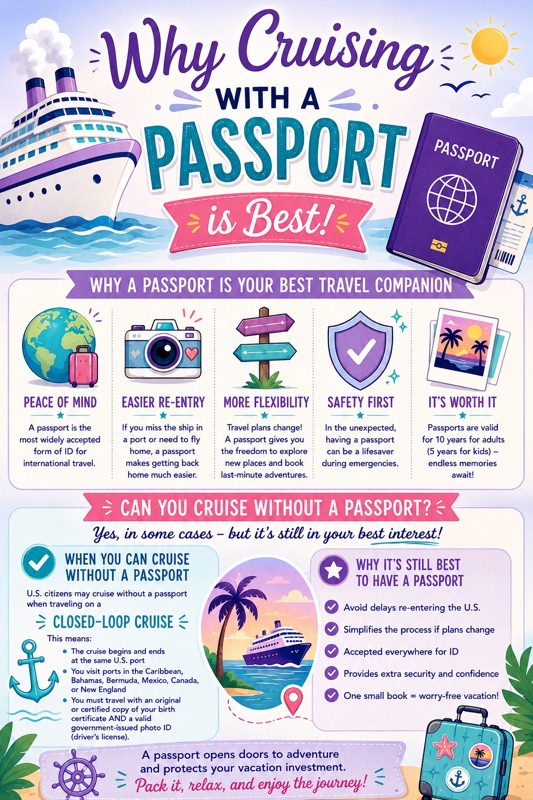
Do You Really Need a Passport for Your Cruise?

​This is one of the first questions almost every client asks me: do I actually need a passport for this trip? The answer isn't always what people expect, so let's walk through it together — and I'll share why I recommend bringing one no matter what.

The Quick Answer

It depends on your itinerary. If you're taking a "closed-loop" cruise — one that departs from and returns to the same U.S. port — you can technically sail with just a government-issued photo ID and a certified birth certificate.

But a passport book is required if any of these apply to your trip:

  • You're sailing one-way, with different start and end ports
  • Your cruise starts or ends outside the U.S.
  • You need to fly internationally to reach your ship

Why I Recommend Bringing One Anyway

Even when a passport isn't required, I still encourage every client to pack one. A few reasons why:

  • Emergencies happen. If you miss the ship or need to leave early for a medical reason, a passport is the only way to fly home. Without one, getting back can be far more complicated.
  • Some ports are stricter. A handful of Caribbean and Bahamian stops enforce tighter entry rules, even on round-trip sailings.
  • It's one less thing to think about. Having it with you means smoother check-in and total peace of mind.

Good to know: Most destinations want your passport valid for at least six months beyond your return date. If yours is getting close, it's worth renewing before we finalize your booking.

Traveling with Kids?

On closed-loop cruises, children 15 and under typically just need a birth certificate — no photo ID required. For international or one-way itineraries, kids need their own passport, just like adults. If only one parent is traveling with the children, there's often additional paperwork involved, which I'll walk you through well ahead of your trip.

What's New for 2026

  • Since February 1, 2026, travelers flying domestically without a REAL ID or another acceptable form of ID may be charged a $45 fee by TSA to verify their identity. A passport always counts as acceptable ID, so you're covered either way.
  • REAL ID doesn't affect cruise boarding — it's strictly a rule for air travel. For your cruise, you'll still need a passport, passport card, or birth certificate with photo ID, depending on your itinerary.
  • Enhanced Driver's Licenses, available in a few states, work for closed-loop cruises but aren't accepted for international flights.

How I Help

Every cruise itinerary is a little different, and the document requirements can shift depending on your ports, your family, and your citizenship. When you book with me, I'll walk you through exactly what you need and when you need it by, so nothing is left to guesswork.

Along the way, I'll also talk with you about Allianz Travel Insurance. Even with the right documents in hand, unexpected things can happen — delayed flights, sudden illness, last-minute changes. Having the right coverage means you're protected no matter what comes up. I'll help guide you to the right policy, and Allianz's team is available directly for any claims or policy-specific questions.

Cruising should feel exciting and simple — that's what I'm here to help you with.


✨ Ready to start planning your cruise? ✨

📅 Book a Free Call🌊 Get Your Vacation Quote

Can't wait to help you set sail,
Ann

Wednesday, August 19, 2026

Your Disney Trip, Simplified: A Guide to the My Disney Experience App


Your Disney Trip, Simplified

One app quietly holds your whole vacation together — your tickets, your dining, your ride plans, even your room key. Here's everything the My Disney Experience app can do for you, and how to make it feel effortless.

Setting Up Before You Leave Home

The magic doesn't start under the "Walt Disney World" arch — it starts with a little setup on your phone, days or weeks before you ever pack a bag. A few minutes now saves a lot of fumbling later.

  • Create or log in to your Disney account — this is your home base for tickets, hotel, and dining. 
  • Download and update the app — available on the App Store and Google Play. Grab the latest version before you go. 
  • Link your tickets and hotel reservation — I take care of this for you when you book with me, so it's one less thing on your list. 
  • Build your Family & Friends list — this keeps everyone's tickets and plans organized in one shared view. When you book with me, I help make sure this is set up correctly and who to connect if there are issues.
  • Explore the parks virtually — browse ride details, menus, and height requirements so nothing catches you off guard.
A note from Ann

When you book with me, I also handle your dining reservations at the 60-day mark — so by the time your trip arrives, you'll simply need to show up and enjoy it.

Lightning Lane, Made Simple

Disney has streamlined how Lightning Lane works, shifting more of it to pre-arrival planning so there's less to figure out once you're in the parks. Here's the current lineup:

  • Multi Pass — hold up to three ride selections at a time, with more added as you use them. Booking opens earlier for resort guests than for those staying off-site. 
  • Single Pass — pay-per-ride for a small handful of the most in-demand attractions.
  • Premier Pass — a VIP-style option offering one-time access to every participating Lightning Lane in a single park, with no return times to track.
  • Trip Checklist — a newer in-app feature that shows you exactly when your Lightning Lane booking window opens, along with your other key planning deadlines, in the order you need to tackle them.
A note from Ann

I don't book Lightning Lanes on your behalf, but I'll gladly set up a consultation to walk through the best strategy for your family, so you head in feeling confident rather than rushed.

Your Best Friend Once You're There

Once you've scanned into your first park, the app shifts from planning tool to daily companion. A few features worth knowing:

  • Live wait times for rides and shows, updated in real time. 
  • Mobile food ordering at select quick-service restaurants, so you can skip the line entirely. 
  • Your combined "My Plans" view — today's plans and upcoming plans now live together in one place, rather than split across separate screens. 
  • Disney MagicMobile, which turns your phone into your park ticket and, for many resort guests, your room key.
  • My Disney Wallet, a newer feature for securely storing and managing payment methods right in the app.
  • PhotoPass integration — especially handy if you've added Memory Maker, so your photos appear almost as soon as they're taken. 
  • Restroom and navigation help, with GPS-style directions around the parks and resort.
  • Plan reminders for dining, Lightning Lanes, and showtimes, so nothing slips by unnoticed.

What to Bring So the App Never Lets You Down

The app works hard all day, so it's worth giving your phone a little support:

FuelRod swappable charger (available in the parks)
Phone lanyard or crossbody case
Rain-friendly phone case or pouch
Updates downloaded before you leave home

If You'll Be Using DAS

For guests who use Disability Access Service, DAS registration happens ahead of time through a brief online video chat, and once it's approved, your DAS details and return-time requests show up right in the app alongside your other plans. If this applies to your family, I'm happy to walk you through the process — it's something I understand personally, and I'm glad to help make it feel less daunting.

Ready to Make Disney Feel Easy?

Let's get your trip set up right from the start — I'll handle the details in the app so you can simply enjoy the magic.

Disney World Entry Made Easy: MagicBand+ vs. Key to the World vs. Phone (2026 Guide)

Planning your Walt Disney World vacation? One of the first things you’ll want to figure out is how you’ll get into the parks, tap into Lightning Lanes, and link all those magical photos.

Disney gives you three options:

  1. MagicBand+ (the wristband)
  2. Key to the World card (a free plastic card)
  3. Disney MagicMobile (your phone or smartwatch)

Each option works differently, and each comes with pros and cons. Here’s your 2026 guide to choosing the right one.

What is MagicBand+?

MagicBand+ is Disney’s latest wearable tech. It’s waterproof, rechargeable, and connects directly to your Disney account.

MagicBand+ can:

  1. Tap to enter the parks.
  2. Tap into Lightning Lane entrances (Multi Pass, Single Pass, or Premier Pass).
  3. Unlock your Disney Resort hotel room.
  4. Link PhotoPass pictures and automatically add them to your Memory Maker package.
  5. Charge food and merchandise (for resort guests).
  6. Light up and vibrate during nighttime shows, interact with Star Wars: Galaxy’s Edge, and “wake up” Fab 50 statues.

👉 Where to get it: Pre-order through your Disney Resort reservation, buy on shopDisney.com, or pick one up at most park and resort shops.

What is a Key to the World Card?

The Key to the World card is a simple, free plastic card—Disney’s old-school option.

Key to the World cards can:

  1. Tap for park entry.
  2. Access Lightning Lanes.
  3. Unlock your Disney Resort hotel room.
  4. Link PhotoPass pictures for download through Memory Maker.
  5. Charge food and merchandise (for resort guests).

👉 Where to get it: Free at your Disney Resort front desk.

What is Disney MagicMobile?

MagicMobile turns your phone or smartwatch into a Disney ticket. It’s free and set up through the My Disney Experience app.

MagicMobile can:

  1. Tap for park entry.
  2. Tap into Lightning Lanes.
  3. Link PhotoPass photos for download with Memory Maker.
  4. Store tickets for multiple guests on one device.

👉 Where to get it: Create a pass in the My Disney Experience app, then save it to Apple Wallet or Google Wallet.

⚠️ Limitations: MagicMobile does not unlock hotel rooms or allow room-charge purchases, and it depends on your phone/watch battery.

Pros & Con

MagicBand+

✅ Most convenient, all-in-one

✅ Interactive, fun designs

❌ Extra cost & needs charging

Key to the World Card

✅ Free, reliable, no charge

✅ Works everywhere MagicBand+ does (minus the glow factor)

❌ Less convenient to pull out each time

MagicMobile

✅ Free & quick to set up

✅ Great backup option

❌ Doesn’t open hotel rooms or allow charges

❌ Uses your phone/watch battery

Accessories That Make Life Easier

Make whichever option you choose even better:

  1. MagicBand+ Protectors & Chargers – Shop Protectors Here
  2. MagicBand+ Styles & Upgrades
  3. Disney Lanyards for Key to the World Cards – Shop Lanyards Here 
  4. Card Holder for Lanyards - Shop Card Holder Here

Final Recommendation

  1. Choose MagicBand+ if you want the smoothest, most magical experience.
  2. Choose the Key to the World card if you’d rather keep it free and simple.
  3. Always set up MagicMobile as a backup—it’s free and could save the day.

With one (or all three) of these options, you’ll be ready to unlock the magic, breeze through Lightning Lanes, and capture every Memory Maker photo at Walt Disney World.

I love to help your family plan their Magical adventure. Click the link below 👇

Disclosure: This post contains affiliate links. If you purchase through these links, I may earn a small commission at no extra cost to you. I only recommend products that add real value to your Disney vacation.